










Smarter Route Planning and Fleet Logistics for Faster Rental Deliveries
Eliminate last-minute dispatch scrambles and wasted mileage. Turn confirmed jobs into optimised multi-stop runs, assign vehicles with drag-and-drop ease and capture digital driver sign-offs on site.
Keep vehicles, drivers and delivery schedules moving on time
Connect sales quotes, warehouse dispatch and field transport automatically, so every delivery, collection and service call lands on the right vehicle with a realistic schedule.
Confirmed Jobs Sync Straight to Transport
Adding transport, delivery or collection tasks to confirmed jobspushes them straight into the Route Planner automatically, queued and ready for vehicle and driver assignment without retyping addresses.
Custom Fleet Profiles & Multi-Stop Crew Runs
Build custom vehicle profiles, assign a primary driver alongside up to two crew assistants and combine multiple job deliveries, site collections and equipment service calls onto single daily runs.
Multi-Stop Google Maps & Live Driver Tracking
Plot multi-stop runs on an interactive Google Map, set your preferred drop order with estimated transit times, and view live driver locations in real time when shared from their device.
Four Real-Time Planning Views Built for Every Transport Workflow
Switch between interactive Google Maps and HireHop’s visual Timeline suite in one click, assigning a vehicle or reordering a stop in any view updates every other view across your system instantly.
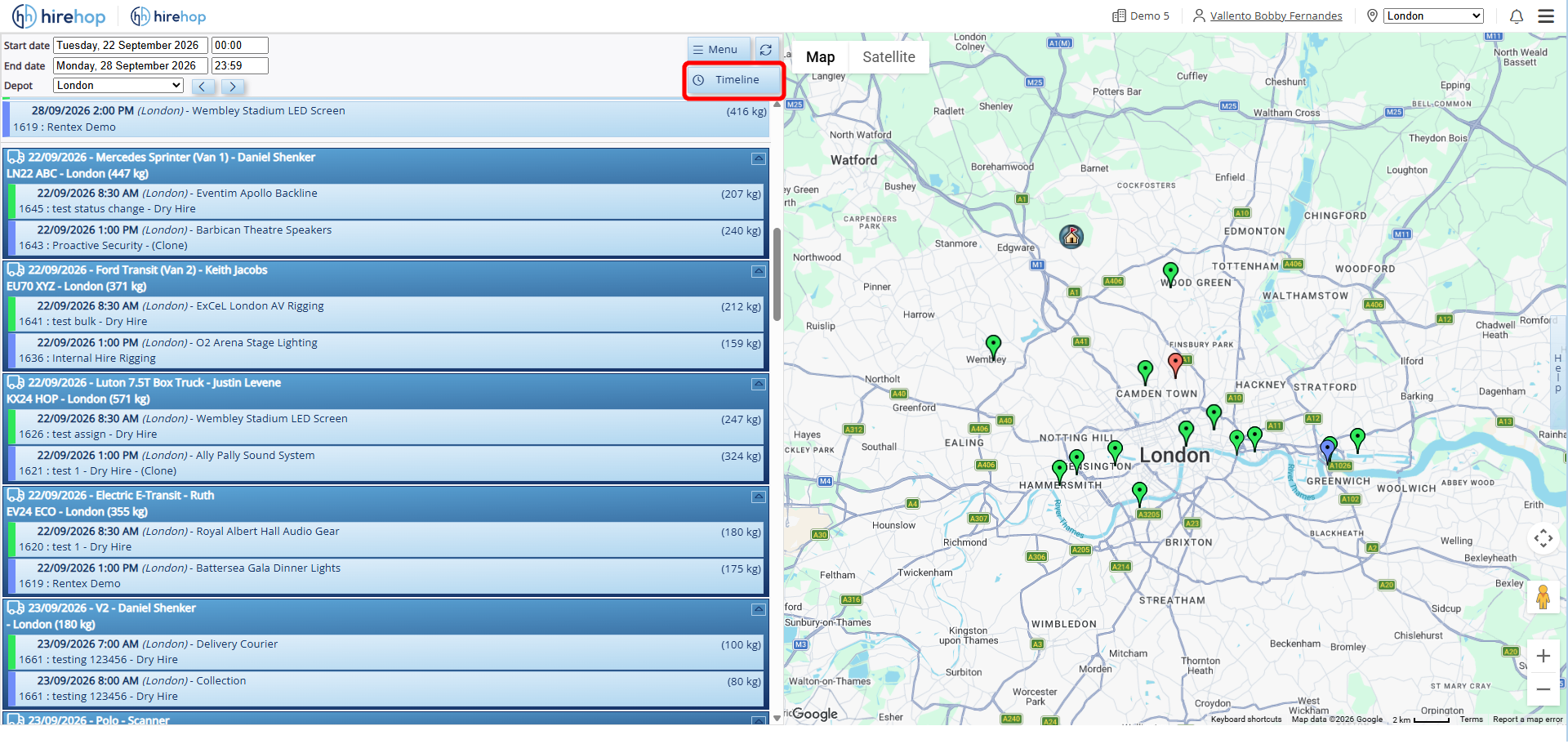
Plot Multi-Stop Routes and Track Live Driver Locations on Google Maps
Visualise every delivery, collection and service call geographically on an interactive Google Map: see live driver positions when shared from their device, and click the Timeline button on the top menu bar to switch into visual scheduling.
- Interactive Geolocation Mapping: Plot multi-stop drop-offs across regions and set the exact drop order that suits your venue windows.
- Route Preview & Estimated Transit Times: Visualise the full planned route on the map with estimated driving times between stops.
- Live Driver GPS Visibility: View driver locations in real time directly on the map whenever drivers share their location via their mobile device.
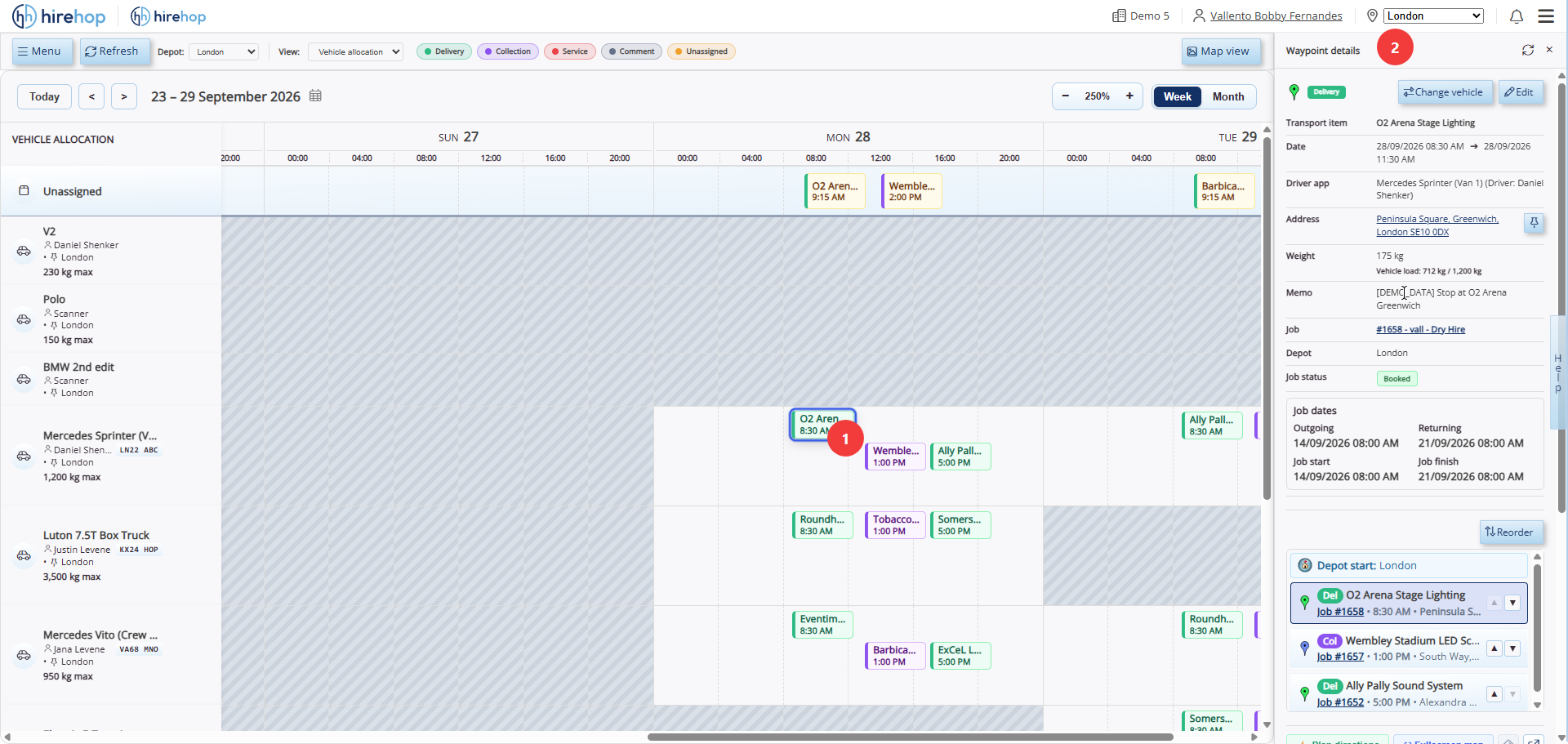
Assign Vehicles, Check Payload Limits and Inspect Waypoint Details
See your entire fleet down the left side with unassigned runs queued at the top, and click any scheduled block to open the Waypoint details panel on the right for live load weights, job notes and stop reordering.
- Unassigned Request Queue: Spot unassigned deliveries, collections, and service calls immediately at the top of the board.
- Slide-Out Waypoint Inspector: Click any stop to view venue addresses, memos, driver assignments, and live vehicle load against max payload (kg).
- Quick Vehicle Swaps & Stop Reordering: Reassign vehicles in one click or reorder multi-stop sequences directly from the right-hand drawer.
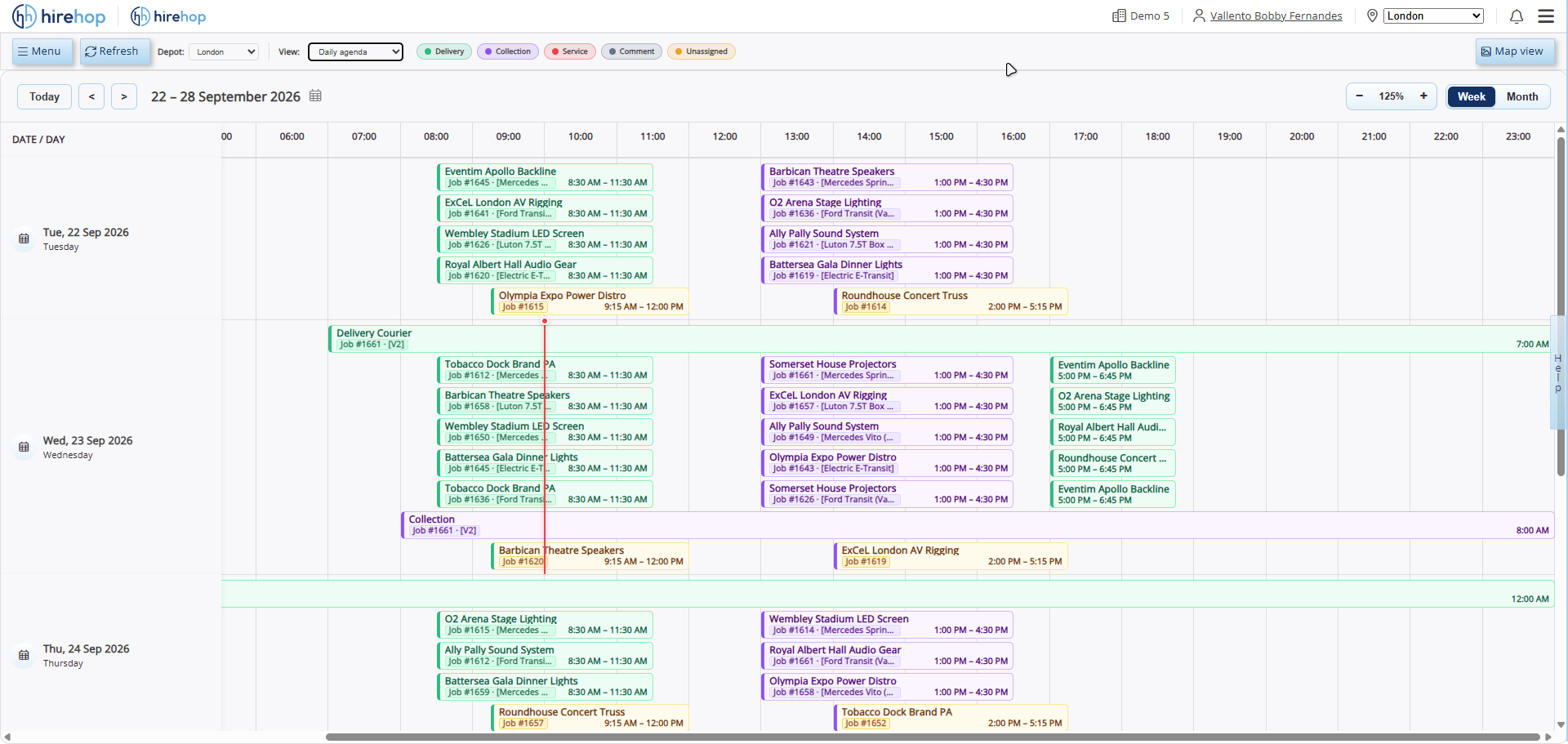
Review Daily Transport Waypoints Chronologically With Colour-Coded Filters
See every transport waypoint laid out chronologically day-by-day in a clean calendar format, making it easy to spot peak pinch points and unallocated runs before the morning load-out.
- Colour-Coded Status Filtering: Filter instantly by Delivery, Collection, Service/Other, Comment or Unassigned.
- Workload Density at a Glance: Identify heavy morning or late-night turnaround windows across your daily transport schedule.
- Real-Time Cross-View Sync: Any change made in Daily Agenda updates Vehicle Allocation, Timeline Planner and Map views immediately.
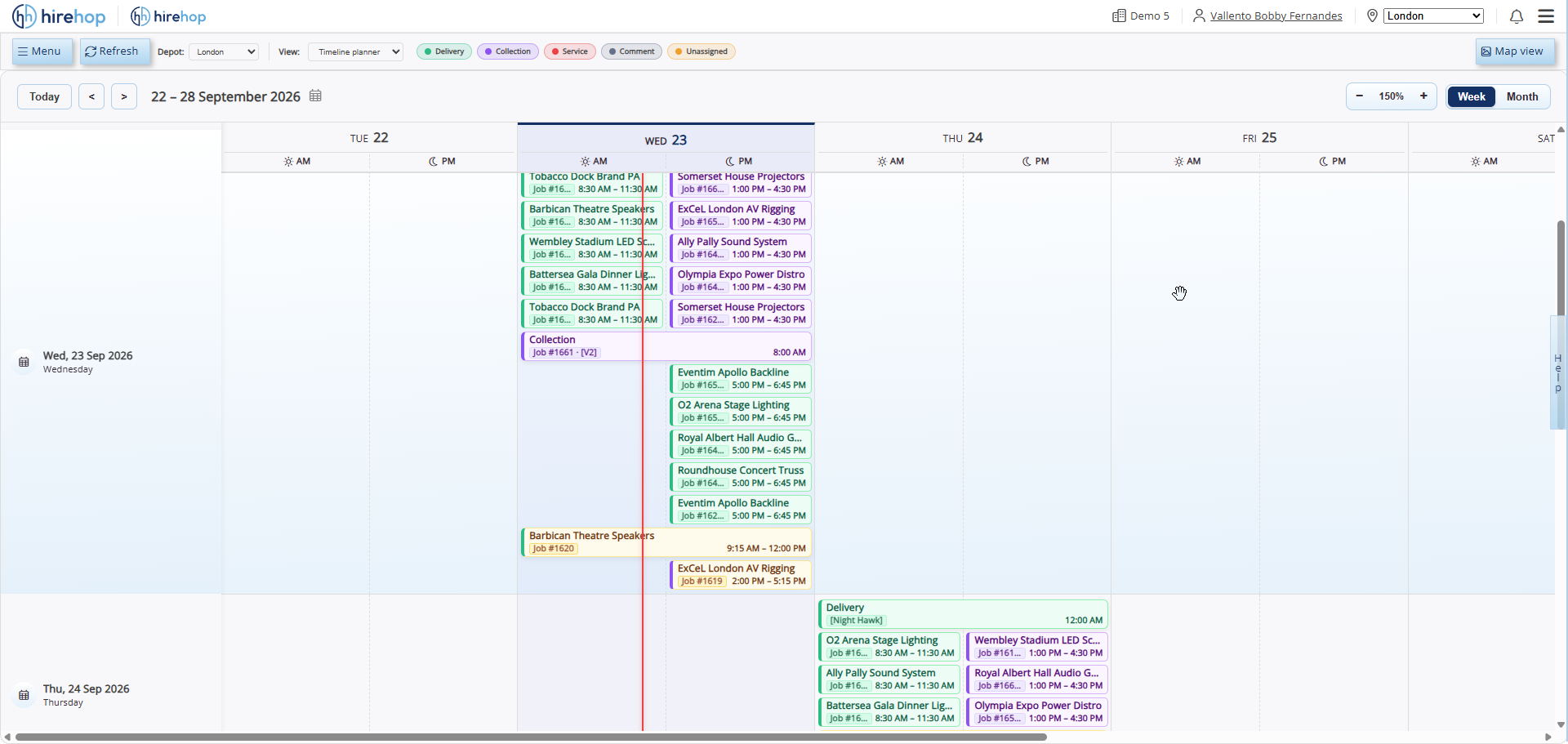
Forecast Week and Month Fleet Demand Well in Advance
Zoom out to a high-level visual timeline spanning across your week or month, helping transport managers anticipate seasonal surges, coordinate multi-day show runs, and balance vehicle demand ahead of time.
- Multi-Day & Weekly Horizon: Track multi-day tour transport and overlapping event runs across a single continuous timeline.
- Early Surge Detection: Spot days where vehicle demand exceeds fleet capacity early enough to arrange sub-hired transport.
- Connected Job & Fleet Context: Keep office coordinators, warehouse bays and drivers aligned on upcoming transport commitments.
Put Live Run Schedules and Digital Sign-Offs in Every Driver’s Pocket
No app-store installs or paper delivery notes required: drivers open their daily run on any smartphone to navigate stops, log site photos and capture customer signatures on the spot.
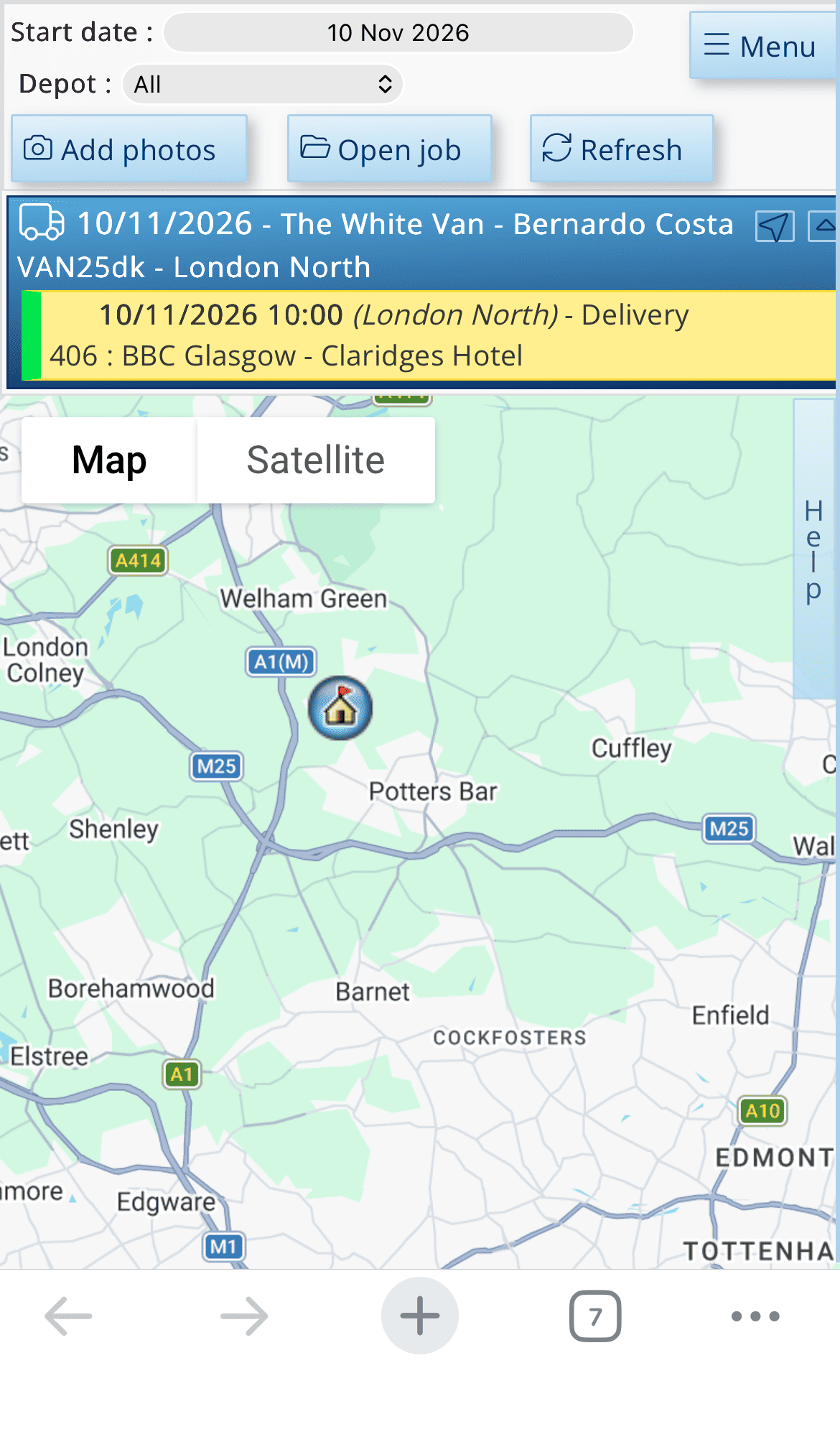
Live Daily Run Schedules on Any Device
Drivers see their assigned deliveries, collections and service calls in stop order, updating automatically if transport coordinators adjust the schedule back at the depot.
One-Tap Google Maps Turn-by-Turn Navigation
Launch turn-by-turn Google Maps directions directly from each job stop, eliminating manual postcode entry and keeping multi-stop runs on time.
Capture loading-bay access photos, equipment condition on drop-off, and internal crew notes right from the job site—syncing immediately back to the main job record.
Capture loading-bay access photos, equipment condition on drop-off, and internal crew notes right from the job site—syncing immediately back to the main job record.
On-Screen Digital Proof of Delivery (POD)
Capture customer sign-off signatures directly on the driver’s mobile screen upon delivery or collection, creating an instant digital paper trail alongside your delivery notes.